Frequently Asked Questions
Here are answers to some of your most frequently asked questions about personal and business bank accounts, online banking, secure transactions, transferring accounts and much more.
Top Questions
-
How can I receive technical support at any time?
In today’s busy world, online banking is a major convenience. You can bank anywhere and at any time. But what happens if you run into a snag? Where can you turn for help? At Kindred, we’ve got you covered 24 hours a day, 7 days a week. Here’s how to know who to call.
Monday – Friday 8:00am-6:00pm
Call our Member Contact Centre at 1.888.672.6728. We have extended hours for your convenience. Our live, local representatives are available to assist you with things like:
- Online technical support and troubleshooting
- Mobile app support and troubleshooting
- Financial transactions (including account inquiries, bill payments, transfers between accounts, and more)
- Ordering cheques or updating products and services
- Updating contact information
- Booking appointments
When we cannot directly answer you questions, we can connect you with in-branch experts to assist you further.
Outside Business Hours:
If you need assistance to access your accounts online outside of our Member Contact Centre hours, we have technical support available 24/7! Call 1.888.273.3488 for assistance with:
- Online technical support and troubleshooting
- Mobile app support and troubleshooting
If you need help with any of your online banking needs, please contact us. We’re here to serve you!
-
What do I do if I've lost my debit or credit card?
Please report a lost or stolen card as soon as you notice it’s missing.
Report a Lost or Stolen MEMBER CARD® debit card:
During business hours, please call our Member Contact Centre at 1.888.672.6728
After hours, please call 1.888.277.1043Report a Lost or Stolen Mastercard® Card:
Within Canada / Continental US call 1.855.341.4643
Outside Canada / Continental US call 1.647.252.9564 -
What are Member Shares and Profit Shares?
When you open a membership with us, your first $25 is invested in Member Shares. This is not a fee; it’s an ownership stake in Kindred. This investment belongs to you, and is refundable to you if you happen to close your membership. As a member-owner, you have an equal voice in how the credit union is run. Together, as a group of engaged members, we can ensure that Kindred continues to reflect our shared values.
Owners receive Profit Shares!
One of Kindred’s core values is stewardship. As a values-centred, faith-inspired financial cooperative, we’re called to manage the funds entrusted to us with integrity as we walk with our members on their journey to be good stewards of their finances.For Kindred, stewardship also means giving back to our members and the communities in which we live and work. Kindred remains quite unique amongst credit unions – we continue to share 25% of our annual profits with members. In fact, over the last 10 years we’ve shared $10.5 million with you!
Although the more business you do with Kindred – deposits or loans – the more Profit Shares you receive, all members receive a minimum of $5 each year. Members who have accumulated $50,000 in Profit Shares receive any additional amounts as 100% cash.
Give yourself a Tax break with Profit Shares
At any time during the year, members can transfer their Profit Shares funds from non-registered to registered Profit Shares (RRSP) that would then be deductible for tax purposes. -
How do I use the online loan, savings, and mortgage calculators?
Kindred Credit Union provides you with a variety of interactive online calculators to help you estimate the amount of your mortgage payments, loan eligibility, educations or retirement savings, and more. Once you input your information, you can view the customized calculations in a graph and as a report. You can also print or save your results for later reference.
These calculators are not intended to provide investing or lending advice. We cannot and do not guarantee their applicability or accuracy. All examples are hypothetical and are for illustrative purposes only.
Online Banking and Credit Cards
-
How do I set up online banking?
 Here is what you’ll need to get started with online banking:
- Access Card Number
- Personal Access Code (PAC) (PAC is simply another name for ‘password’.)
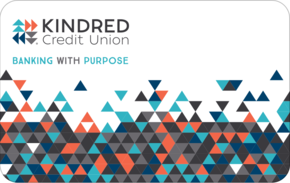
Tip! You’ll find the 16 digits you need on the back of your Access Card, which looks like this picture.
Don’t have your Access Card or Personal Access Code handy? Call our Member Contact Centre at 1.888.672.6728.
Logging in for the first time:
- Got to auth.kindredcu.com/login.
- In the Access Card Number field, enter your access card number. (Note that you do not need to include the dash.)
- In the Access Code (PAC) field, enter the temporary PAC that Kindred provided to you. (PAC is simply another name for ‘password’.)
- Click Login. When prompted, create your own personalized PAC, following the requirements.
- You’ll be prompted to enroll in 2-step verification with one of three contact methods: text, email, or voice call.
-
How do I link my Collabria credit card?
It just got easier to manage your Kindred Collabria Mastercard account! Personal cardholders can now log in to Kindred’s Online Banking to view Kindred Mastercard transactions, and other Collabria credit card account information, all in one place. Here is how you get started!
-
How can I manage my Kindred Mastercard online?
Personal cardholders, you can access your account information online using CardWise Online or download the CardWise Mobile App for iPhone or Android devices.
Business cardholders, you can access your account information online using MyCardInfo Online.
These platforms allow you to view your balance, set up automatic monthly payments and more, with security and ease!
-
How do I add a payee in online banking or on the mobile app?
It’s easy for you to add a payee in online banking or on our mobile app.
- Log into Online Banking or our Mobile App on your device.
- Click on Pay Bills
- Click on Manage Payees through the app or Add/Delete Payee through online banking.
- Click on Add Payee
You can search for a new payee by name. You can also browse by type, such as cable companies, or utilities* Once you have located the payee, add the required account number, and then click on Add Payee. For some high-risk payees, you may be required to provide a 2-step verification code. Read more about 2-step verification here.
*If the company you are looking for is not on this list, please contact us. Member demand is one of the factors that will be taken into account when revising the list. We strive to ensure that all members across Ontario have the ability to use Online Banking to pay for basic services.
-
How do I use 2-step verification to secure my online bank account?
How does 2-Step Verification work?
In addition to entering your password when logging in, a one-time use verification code will be sent to you via text message, voice call, or email. The code must be submitted to access your account online.
Why is Kindred requiring 2-Step Verification?
Kindred is requiring that all members to use 2-Step Verification as an added layer of security. 2-Step Verification is safer than remembering the answers to challenge questions. Cyber threats such as malware and phishing attacks are becoming increasingly sophisticated. A stronger, more secure authentication process involving a verification code will provide an additional layer of security.
Can I opt out of 2-Step Verification?
No. 2-Step Verification provides an extra layer of security to protect your accounts in case your password is ever compromised. All members with online banking are required to enroll in 2-Step Verification.
When will I need to use 2-Step Verification?
A risk engine will determine when it’s appropriate to prompt you for a 2SV code. The risk engine takes multiple factors into consideration, including user behavior (e.g. time, location, etc.) and device (e.g. browser, internet connection, device type, etc.). You may be prompted with 2-Step Verification:
- When you enroll or change 2SV contact methods
- At login
- When specific online banking tasks are attempted, including changing your password, adding a new bill payee, or setting up an e-Transfer recipient.
How do I set it up?
You’ll be prompted to set up 2-Step Verification when you log in to online banking or our Mobile App after September 12. Simply follow the prompts on screen to get started.
Will my memorized account information be affected?
Yes, your memorized account information for online banking access will be lost when we upgrade your online banking experience. You’ll be able to use the same password, however you will need to re-enter your Access Card number. If you use Face ID or Fingerprint ID, you will be able to set it up again, once you have logged in with your Access Card number and password.
Can I mark a device as “safe” to be asked for a 2SV code less often?
Yes. A checkbox will appear on the device (i.e. browser or app) to be asked for a 2-Step Verification code less often when logging in on that device. You may still be asked when conducting other transactions online.
Do verification codes expire?
Yes. Verification codes are only valid for 10 minutes once generated. Each new code replaces any previous code sent to you.
How long does it take to receive a code?
Codes should be received almost immediately, within several seconds, sent by email, text, or voice call. If you don’t receive a code through the expected contact method, click the link to send another code.
Do I need to do anything differently to use online banking going forward?
The way you log in to your accounts can change as we upgrade technology and enhance security features. To maintain uninterrupted access to your accounts you must use your Access Card to login to online banking. This number is different than your MEMBERCARD debit card number. Here's what you should do:
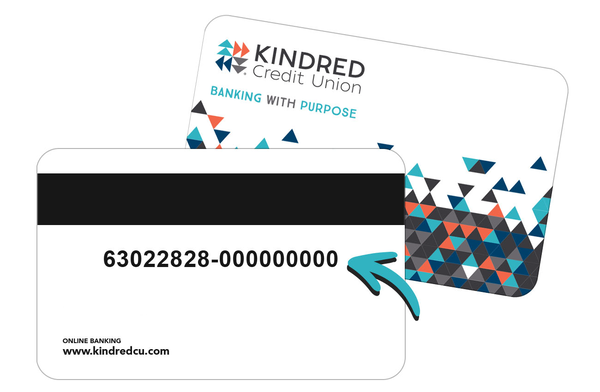
Enter your Access Card number the next time you log in to online banking (the first eight digits may or may not be pre-filled; don't include the dash).
Can't find your Access Card or don't have a record of your Access Card number?
No problem, just give us a call at 1.888.672.6728 and we'll be happy to provide it to you.
Can I register multiple 2-Step Verification contact methods?
Yes. When you first enroll, you can enter only one choice (text, email or voice call) to receive notifications. However, you can update your contact information using the Profile and Settings screen to add another notification channel.
The 2SV code was sent to an email or phone number I no longer have access to. What should I do?
Visit any branch or contact our Member Contact Centre. We can help!
What should I keep in mind if I travel outside of Canada?
If you are planning a trip outside of Canada, be sure you will have access to the contact method you are currently using for 2-Step Verification. If you have selected text notification but will not have your usual mobile device with you on your trip, you can update your contact information to receive these kinds of notifications by email.
Follow these steps to change your 2-Step Verification contact information:
- Sign into online banking
- Click on Profile and Settings
- Choose Change 2-Step Verification Information
- Update your contact information
Personal Banking Accounts
-
How can I easily switch to Kindred from my current bank?
We’re here to help you every step of the way. We know that switching can feel complicated – we make it easy for you. Contact us at 1-888-672-6728 or book a time to start switching your everyday banking today.
Step 1: Choose a Kindred Account
Values-centred banking that empowers families, farmers, and faith communities in southwestern Ontario to give, live, and grow! Watch our Welcome to Kindred video or visit our Membership page to learn more.
Explore Kindred’s Personal, Business, and Organization accounts for a better choice for banking. Or, to help you understand what account works best for you, visit a branch near you or book a meeting to speak with us in person, on video chat, or over the phone at your convenience.
Step 2: Open the Account
Visit a local Kindred branch to open your account, or if you’re ready to make a better choice, open an account online today!
For Personal Accounts, you will need a government issued photo ID, Social Insurance Number, and $25 toward Member Shares.
For Businesses and Organizations, requirements vary depending on your business. See our Business Banking: Account Switching Information listed in the Switch Kit below for what you may need.
Step 3: Fund the Account and Update Automatic Transactions
Add money to your new Kindred account to get things started. You can transfer funds from your existing bank by Interac e-Transfer, certified cheque, bank draft, wire transfer, or personal cheque.
Next, update any automatic transactions connected to your old account. This includes pre-authorized payments (like utilities, subscriptions, or other recurring bills) and regular deposits (such as payroll or benefits). Check out the Switch Kit below or find out more on how to set up pre-authorized payments or direct deposit.
Reminder! Our account switching service aims to make the process as easy as possible – book a time with a Kindred team member when you are ready.
Step 4: Make the Most of Services and Tools for Kindred Members
Once your account is up and running, take some time to explore our Ways to Bank for Kindred members – from everyday digital banking features to in-branch support, we offer a number of convenient ways to help manage your money with confidence and ease. Kindred is part of the largest surcharge-free ATM network in Canada, giving members access to nearly 4,000 ATMs across the country.
If it is your first time using online banking, see our full instructions for setting up Online Banking.
Step 5: Close Your Old Account
Once all your deposits and payments have successfully moved to your Kindred account and any remaining balance is cleared, you can close your old account. This final step helps keep things simple and ensures everything is in one place.
If you’d like help confirming the timing or have questions before closing your account, we’re here to support you every step of the way.
Explore Kindred’s blog for more information on switching financial institutions and how Kindred is here to help you.
Switching Made Easy – ClickSwitch and Kindred’s Switch Kit
ClickSWITCHWith a personal account at Kindred, ClickSWITCH® can help move your direct deposits and pre-authorized payments from another financial institution. In just a few minutes, ClickSWITCH helps you move direct deposits and recurring payments to your Kindred account. Plus, it helps ensure you don’t miss any payments while you change your primary financial services provider. Depending on the payment type, some switches are better done directly through the provider – get in touch with us to better understand how we can help you optimize your ClickSWITCH experience!
What you’ll need to begin ClickSWITCH
- Personal chequing account with Kindred
- Online banking access with Kindred
- Your current pre-authorized payment and direct deposit information
How it Works
- Log in to online banking to enroll with ClickSWITCH by reviewing and/or selecting the account(s) you want ClickSWITCH to switch your deposits and payments to.
- Gather information for your existing deposits and payments to be switched.
- Submit each switch and ClickSWITCH will provide customized instructions based on the switch you’re wishing to complete, including generating and sending forms to your payors and providers.
- You can review the progress and status of your submitted switches.
Whether using ClickSWITCH or going direct through the billing provider, we are here to support you every step of the way – visit a local branch or contact us to start switching your everyday banking today.
SwitchKit
Whether choosing to switch self-serve or have us help you along the way, below are a list of tools to help guide the process.
-
How do I set up pre-authorized payments or direct deposit?
Void Cheque Forms
To set up direct deposits or pre-authorized payments, download our Void Cheque form and send it to each of your depositors/billers. You can also use this form to change your pay deposits with your employer. This form can be downloaded after you log in to online banking.
From a browser, there are three ways you can access a void cheque form:
- From the menu on the left, under Account Services, there is a Void Cheque option. Select the desired account in the Void Cheque screen and click Submit.
- From the Account Summary screen, select the three-dot menu under the Action heading beside the desired account. Then select Download Void Cheque (PDF).
- In the Account Activity screen when viewing details of the desired account, click on the hyperlink for the Download Void Cheque (PDF) below the Account Details menu.
- From the app, the Void Cheque form can be downloaded from the Account Activity screen. Press Accounts, then select the desired account. Expand Account Details and select the hyperlink to Download Void Cheque (PDF).
If you do not currently have access to online banking or the app, you can download a blank Direct Deposit / Pre-Authorized Payment Form.
CRA direct deposit enrolmentCRA direct deposit enrolment for personal and business accounts can be completed online when you log in to online banking. Navigate to Account Services in the left menu, then Set up CRA Direct Deposit.
Personal members can receive the following CRA payments through direct deposit:
- Income tax refund; Canada Child Benefit;
- Goods and Services Tax/Harmonized Sales Tax (GST/HST) credit;
- Canada Workers Benefit;
- and related provincial and territorial payments.
Business Members can receive the following CRA payments through direct deposit:
- corporate income tax refund
- Goods and Services Tax/Harmonized Sales Tax refund
- refund of excise tax or other levies
-
How can I bank with Kindred in person, online, on a mobile device, and more?
We offer a number of convenient ways to bank, from in person options to remote alternatives.
If you’re not yet set up with our remote banking alternatives, now is a great time to do so. This will ensure you’re able to continue banking with us, even if you’re not able to visit us in person. You can access your accounts in many ways.
Here are the details for all the ways you can bank with Kindred Credit Union, at any time, from anywhere.
Business Banking Questions
-
How do I set up and use Remote Deposit Capture for my business?
Recommended Scanner
You will need to purchase a scanner in order to use Kindred’s Remote Deposit Capture service. At this time we recommend the Panini Vision X Scanner (part number PN1/VX50.1.FFNJ) for members scanning 100 or fewer cheques per day.This recommended model scans 50 cheques per minute—we believe it’s sufficient for scanning 100 or fewer cheques per day.
Ordering Process
- For scanners, warranty programs and supplies, you can purchase online at https://portal.paystation.ca/shopnow/. Kindred members receive preferred pricing through Paystation!
- Create a new account.
- Once the account is created, you’ll land on the Menu page. Here you’ll be presented with:
- Scanner Comparison chart
- Warranty Options
- Place Order
- Order Status Report (ability to track order)
- Terms and Conditions
- Continue to Place Order.
- Select items for purchase.
- Select to Proceed to Checkout.
- Ensure that shipping information is entered correctly.
- Click Place this Order.
Ensure that credit card and billing information are entered correctly.
Click Submit
Order confirmation will appear onscreen.
You’ll receive an order confirmation email.If your order is received by 3:30 PM EST, Monday to Friday, your order will ship the same business day.
Once the order has shipped, you’ll receive a shipment confirmation email with a tracking number.
All agreements, support, pricing, and purchasing details for the scanners are between Paystation and the purchasing party.
Training Videos
Full instructions for setting up your scanner and using Remote Deposit Capture are outlined in these step-by-step videos: Remote Deposit Capture Training VideosMaintenance
Kindred uses cheque scanners regularly in our branches. The most common problem we see is misfeeds. In our experience, it is very important to follow the cleaning and maintenance recommendations to prevent dust and residue build-up, which can result in mis-feeds and general scanning issues.While hardware warranties are available, delays in completing repairs or deliveries can be frustrating. Please see product manual for full maintenance recommendations, and follow them!
-
How can I bank with Kindred in person, online, on mobile, and more?
We offer a number of convenient ways to bank, from in-person options to remote alternatives.
If you’re not yet set up with our remote banking alternatives, now is a great time to do so. This will ensure you’re able to continue banking with us, even if you’re not able to visit us in person. You can access your accounts in many ways.
Here are the details for all the ways you can bank with Kindred Credit Union, at any time, from anywhere.
-
What is Automated Funds Transfer (AFT)?
AFT is a quick and cost-effective way for businesses, churches, and non-profit organizations to collect and send payments electronically.
Members can easily create Canadian or US dollar transactions to or from accounts at any Canadian financial institution.
Privacy and Security
-
How can I safely transfer sensitive documents using SecureIT, a secure message system to protect my privacy?
As you may already know, email is not a secure method of communicating confidential information. That’s why we use a secure message system called SecureIT that allows us to communicate electronically with you while protecting your privacy. SecureIT allows Kindred staff members and members to share confidential documents using a web browser. Read this guide for details on how to set up and use SecureIT.
-
How do I protect myself from fraud and scams?
Protecting your privacy and safeguarding your personal and financial information is just as important to us as it is to you.
Kindred offers up to date tips and advice for safeguarding your personal information and protecting your accounts from loss and unauthorized access, as well as information about the latest fraud attempts and scams being tired by crooks, along with instructions for what to do if you think your information has been compromised.
Kindred Branches, Hours, and Closures
-
Where are Kindred branches located?
Kindred Credit Union has eight branches in Southern Ontario. We have locations in Kitchener, Waterloo, New Hamburg, Aylmer, Elmira, Mount Forest, Milverton, and Leamington. You can find the closest branch and ATM to you using the interactive map on our Find a Branch/ATM page.
Our head office is located at 1265 Strasburg Road, Kitchener, ON N2R 1S6. This is an administration office only. There are no branch services and no ATM at our head office. -
What are your hours of operation?
Our Member Contact Centre is open from Monday to Friday by phone or email from 8 a.m. - 6 p.m.
Branch Hours
Aylmer, Kitchener, Leamington, Mount Forest, New Hamburg and Waterloo
Monday to Wednesday, and Friday: 9:30 a.m. to 5 p.m.
Thursday: 9:30 a.m. to 6 p.m.Elmira
Monday to Wednesday: 9:30 a.m. to 5 p.m.
Thursday and Friday: 9:30 a.m. to 6 p.m.Milverton
Monday to Wednesday, and Friday: 9 a.m. to 5 p.m.
Thursday: 9 a.m. to 6 p.m. -
On which holidays are your branches closed?
Holiday Closures: Our branches and head office will be closed on the dates listed below for these statutory holidays and observances.
New Year’s Day: January 1, 2026
Family Day: February 16, 2026
Good Friday: April 03, 2026
Victoria Day: May 18, 2026
Canada Day: July 1, 2026
Civic Holiday: August 3, 2026
Labour Day: September 7, 2026
National Day for Truth and Reconciliation: September 30, 2026
Thanksgiving Day: October 12, 2026
Remembrance Day: November 11, 2026
Christmas Eve: December 24, 2026 - Early Closing at 3:00pm
Christmas Day: December 25, 2026
Boxing Day: December 28, 2026
New Year’s Eve: December 31, 2026 - Early Closing at 3:00pm
New Year’s Day: January 1, 2027 -
Where else can I receive in-person service from Kindred?
On-Site Services
In addition to our branches, we offer a weekly presence at Parkwood Mennonite Home in Waterloo each Wednesday from 9:30 to 10:30 a.m. to help residents bank in the comfort of their own home environment.Extended Area Services
Because we’re committed to our rural communities, we have four drop boxes where rural members can make non-cash deposits. These are serviced by our Elmira, Mount Forest, and New Hamburg branches. Please contact your local branch for more details.
Brand and Media
-
Who can I contact at Kindred for media inquiries?
To set up an interview with a Kindred Credit Union representative or to make a media inquiry, please contact:
Frank Chisholm, Director, Brand and Marketing Kindred Credit Union
1265 Strasburg Road, Kitchener, ON N2R 1S6
Phone: 519.746.1010 ext. 5211
Email: frank.chisholm@kindredcu.comYou can read Kindred's latest media releases here.
-
Where can I find Kindred Credit Union's brand style guide and assets?
Please visit this page where you can fill out a short form in order to download Kindred's brand assets, which includes our style guide and various versions of logo.
Joining a Credit Union
-
What is a credit union?
Credit unions are well-regulated, full-service financial institutions. Canada's credit unions put their member’s hopes, dreams, needs, and wants above all else. Canadians who choose to bank with a credit union are choosing to bank with a conscience. Credit unions give back to their members - the people that bank with them - and contribute to their community’s economic and social well-being.
-
Who can join a credit union?
At Kindred, we welcome all Ontarians who share our values and purpose to join us in working to impact the world in amazing ways. Membership eligibility requirements at other credit unions varies. For example, some credit unions serve individuals who live in a particular area, work in a certain industry, or are employed by a specific company.
-
How do I become a member of Kindred Credit Union?
You can become a Kindred member by visiting one of our local branches, scheduling a meeting with us, or applying online. You’ll be asked to provide some identification, such as your Social Insurance Number, and complete some information about yourself.
Member Shares are required for new accounts. Your $25 Member Share investment will be covered using funds from your first deposit. Member Shares are a one-time investment giving you an equal voice in how the credit union is run and a share of our annual earnings. You’ll get this back if you ever leave the credit union.
Visit our Membership page for more information.
-
What types of memberships does Kindred offer?
We offer several types of memberships to serve individuals and groups in our community. Personal memberships are for individuals, either single or joint. Business memberships support farms and businesses of all kinds. Organization memberships are available for persons in the name of an organization (including congregations), whether incorporated or unincorporated associations. Estate memberships are for Kindred members who have since deceased, or the executor of an estate who is a Kindred member and wishes to apply for financial services on behalf of a deceased person. Trust memberships give members the option to hold funds on behalf of another person.
Home Buying Questions
-
How much house can I afford do buy?
Kindred offers an interactive online mortgage calculator to help give you an idea of how the amount of a mortgage, interest rates, down payment, and other details can impact your monthly housing payments.
Find out more about how to use the online mortgage calculator tool.
-
What are the residential mortgage rates?
You can view the current residential mortgage rates for fixed and variable mortgages on our mortgage rates page.
See the latest interest rates for Kindred Credit Union lending and investment products and offers.
-
How can I buy my first home?
Buying your first home can seem daunting, but with the right help you’ll be well on your way. Fixed or variable? Open or closed? Amortization? There’s a lot to learn when it comes to buying a home. Get familiar with your home buying options for first time home buyers
The First Home Savings Account can be a great way for first time home buyers to save money for their down payment to purchase their first home. These accounts offer the benefits of both tax deductions on your contributions and non-taxable earnings.
Learn how to invest to grow your home buying funds and generate your down payment.
Planning for Retirement Questions
-
How much money do I need to retire in Canada?
There are many ways to save for your retirement, but how much do you need? Kindred offers an interactive online retirement calculator to help you find out, so that you can retire comfortably. Planning early is the key to peace of mind.
Find out more about how to use the retirement savings calculator tool.
-
How do I save for retirement?
It’s never too early to start planning for retirement! Not sure where to start? In this article, Kindred explains the basics of retirement planning to help get you started.
Learn more about Registered Retirement Savings Plans (RRSPs).Grow your savings and secure your future with Kindred's Retirement Planning Services.